Customer not Paying
| Scenario | Customer not Paying | |||||
| Customer not Paying | FHC | EPC | ||||
| Step 1 | We will ask about booking time Go through partner profile and search it by booking date & time | We will ask about booking time Go through partner profile and search it by booking date & time | ||||
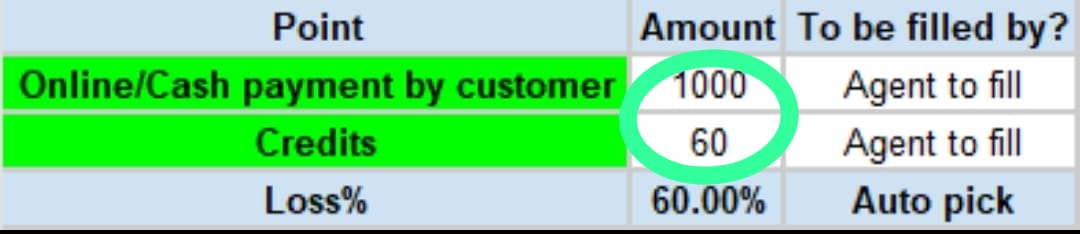
| Customer is not answering the call | If there is no response from the customer, we will call them from our end. If there is still no response, we will inform our partner that we can only refund the credit value. We will guide our partner to end the job minimum amount, following these steps: We will fill lead value Form & Response Sheet keep ticket pending for 24 hours If Partner have receive any partial amount from the customer then we will check partner loss by checking through Loss Calculator if loss is greater than 50% then we will refund partner credit value by filling form keep ticket pending for 24 hours. | If there is no response from the customer, we will call them from our end. If there is still no response, we will inform our partner that we can only refund the credit value. We will guide our partner to conclude the job swiftly, following these steps: We will fill lead value Form & Response Sheet keep ticket pending for 24 hours If the partner has received any partial amount from the customer, we will check the partner's loss using the Loss Calculator If the loss is greater than 50%, we will refund the partner's credit value by filling out a form and keeping the ticket pending for 24 hours. | ||||
| Customer agreed to pay | Try to convince the customer to make the payment during the call. If the customer is facing any issues while making the payment, guide them to raise a ticket with their helpline by following these steps: Customer Profile>>Help Center>> Select the booking>> Chatbot will create ticket We will keep the ticket pending until the partner receives the payment from the customer. If the customer does not make the payment and continues to give commitments, we will pitch a credit value refund to the partner and fill out the form. | Try to convince the customer to make the payment during the call. If the customer is facing any issues while making the payment, guide them to raise a ticket with their helpline by following these steps: Customer Profile>>Help Center>> Select the booking>> Chatbot will create ticket We will keep the ticket pending until the partner receives the payment from the customer. If the customer does not make the payment and continues to give commitments, we will pitch a credit value refund to the partner and fill out the form. | ||||
| Customer denied to pay | If the customer refuses to pay the amount, we can only refund the credit value to the partner. We will fill out the form and keep the ticket pending for 24 hours. | If the customer refuses to pay the amount, we can only refund the credit value to the partner. We will fill out the form and keep the ticket pending for 24 hours. | ||||
| Important Point | Important We will not issue a refund for the lead value if the lead value is 100 credits or more in case the partner has partially delivered the service, and the customer has made a payment for that partial service. | Important We will not issue a refund for the lead value if the lead value is 100 credits or more in case the partner has partially delivered the service, and the customer has made a payment for that partial service. | ||||
| Tagging | 1.2 Money - Payout Issue>> Customer not paying | |||||